v1.0 · free forever · no account

Auto Keyboard Presser handles repetitive typing.

Set up key sequences and let the tool press them automatically while you work on something else. Built for Windows, requires no complex configuration—just define what keys to press and when.

No virus or malwareNo telemetry trackingCompletely free foreverv1.0
Configurable timingSequence supportWindows nativeNo setup neededLightweight
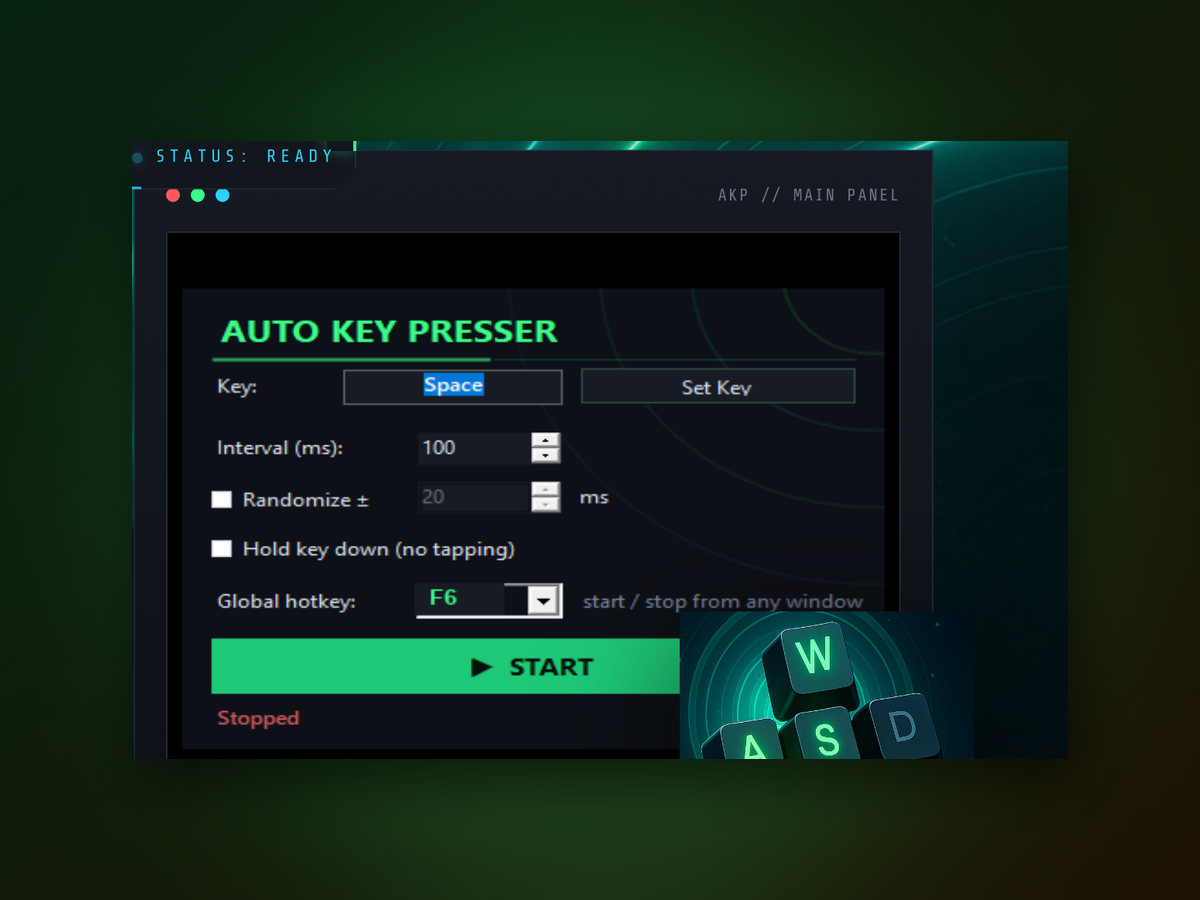
Auto Keyboard Presser app window on Windows
Getting started

How to set up and run your first automation.

Getting started takes just a few clicks and no technical knowledge.

Real-world use
Inside the appAuto Keyboard Presser window

See it working on common tasks.

Auto Keyboard Presser handles everything from test input to form filling consistently. Watch it execute the exact same key sequences every time without variation.

Form auto-fillPress Tab and Enter in a fixed pattern to move through form fields and submit data repeatedly.
Test data entryAutomate entering the same test values across multiple fields or applications.
Repetitive commandsRun hotkey combinations or command sequences on schedule without manual intervention.
Better than alternatives

How it stacks against other approaches.

Auto Keyboard Presser is purpose-built for this task and beats the alternatives on simplicity and cost.

Setup time
Minutes
Hours of learning
Price
Free
Paid licenses
Learning curve
None
Scripting required
Windows only
Yes
Cross-platform bloat
File size
Tiny
Heavy install
No dependencies
Standalone
External libraries
Why it matters

Why use an auto keyboard presser instead of doing it manually.

Manual key pressing for repetitive tasks wastes time and introduces typos; automation handles it perfectly every time.

01

Save hours each week

Stop pressing the same keys over and over. Set it once and let it run while you focus on real work. Even 50 repetitions per day adds up to weeks of freed time per year.

02

Zero mistakes

Humans get tired and miss keys; automation never does. Every sequence executes exactly as written, no typos or missed steps.

03

Works with any app

Auto Keyboard Presser sends key presses to whatever window has focus. Use it with spreadsheets, browsers, terminals, or custom software.

04

Runs in the background

The tool works while you're doing something else entirely. Launch a sequence and step away—it completes on its own schedule.

Technical details

What you are downloading.

Version1.0
PlatformWindows 10 and 11, 64-bit
InstallPortable, no installer
LicenseMIT, source on GitHub
PriceFree, no account
LanguageEnglish
Answers to common questions

Answers to common questions.

Can I use this with any Windows application?

Yes. Auto Keyboard Presser works by sending key presses to whichever window is active, so it functions with spreadsheets, browsers, text editors, games, and custom software alike.

Do I need administrator privileges?

For most uses, no. Some systems may require admin rights to send key presses to certain applications; the tool will let you know if elevation is needed.

Can I pause or stop a running sequence?

Yes. The tool provides controls to stop any active automation immediately, so you're never locked out of manual control.

What if I make a mistake in my key sequence?

Simply edit the sequence in the app and save your changes. You can test with smaller repeat counts before running the full automation.

Is there a limit to how many keys I can string together?

No practical limit. You can build sequences as long as you need—hundreds of keys if the task demands it.

Does this work on Windows 10 and 11?

Yes. Auto Keyboard Presser is compatible with modern Windows versions and runs smoothly on both.

Can I schedule automation to run at a specific time?

The core tool runs on-demand when you press start. For time-based scheduling, you can use Windows Task Scheduler to launch the automation.
Get your repetitive typing on autopilot.

Download Auto Keyboard Presser and reclaim the time you spend on manual key pressing.

Download for Windows
Latest release · v1.0